

library
mpv_audio_kit
A full audio stack for Flutter: libmpv driven over FFI from a background isolate, an ordered chain of typed ffmpeg effects, real-time spectrum and waveform, native media sessions, and its own cross-platform build of libmpv. Ships on Android, iOS, macOS, Windows and Linux.
- GitHub stars
- 34
- pub.dev likes
- 52
- pub points
- 160/160
- Downloads /30d
- 2.2K
Why I built it
Many Flutter audio libraries are built on an old version of mpv, or are too restrictive and hide the audio processing features. mpv_audio_kit exposes the whole engine through a typed Dart API, without blocking the UI thread.
The project is split across three repositories:
- mpv_audio_kit: the Dart/Flutter library, published on pub.dev.
- libmpv-scripts: an audio-only build of libmpv and FFmpeg with custom patches, cross-compiled for five operating systems and driven by a Go TUI.
- MPV Studio: the reference app built on the library.
Architecture
The Player lives on your main isolate and exposes a synchronous state snapshot plus more than 100 streams.
Commands go to libmpv through its async API; a dedicated isolate blocks on mpv_wait_event and posts state
back, so slow network streams and heavy filter graphs don’t block the UI.
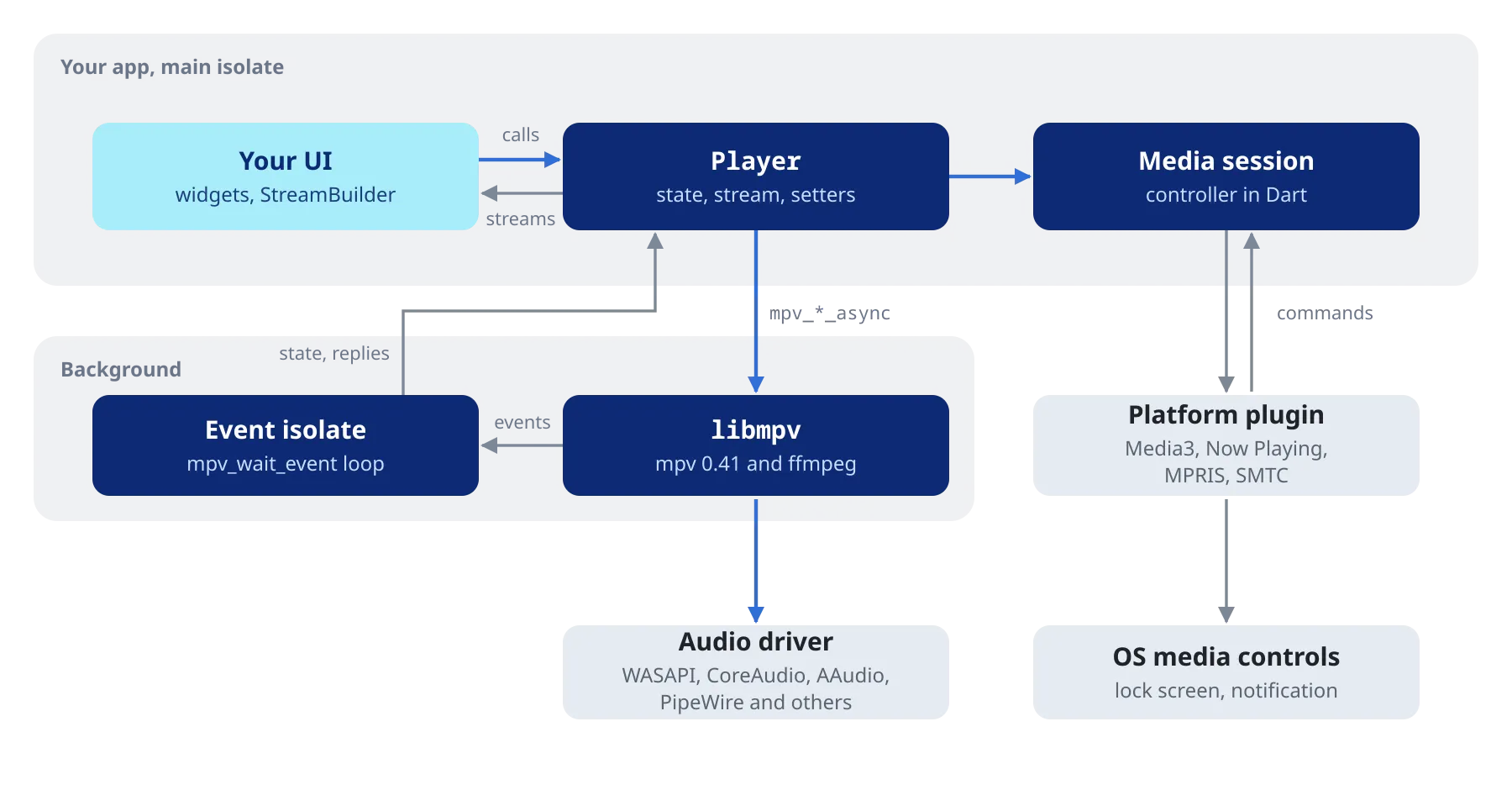
Media sessions (Media3 on Android, Now Playing on Apple, MPRIS on Linux, SMTC on Windows) are driven from Dart, so lock-screen controls and notifications work the same way on every platform.
A typed effects chain
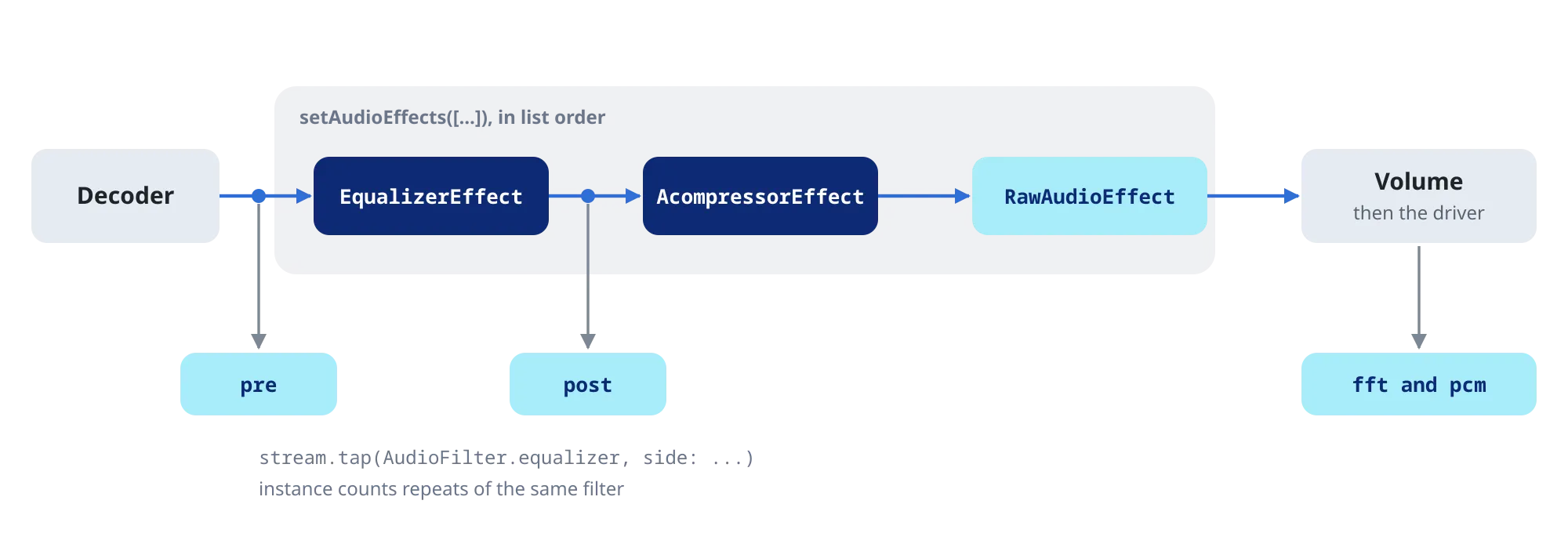
Audio effects are an ordered list of typed stages (18-band graphic EQ, compressor, loudness normalisation, pitch and tempo, bass/treble, stereo width, headphone crossfeed, silence trim) compiled into a single ffmpeg filter graph. Anything not covered by a typed stage can still be dropped in as a raw lavfi filter. Dragging a slider that only changes a stage’s parameters is applied to the running graph in place, with no audible rebuild.
Seeing the sound
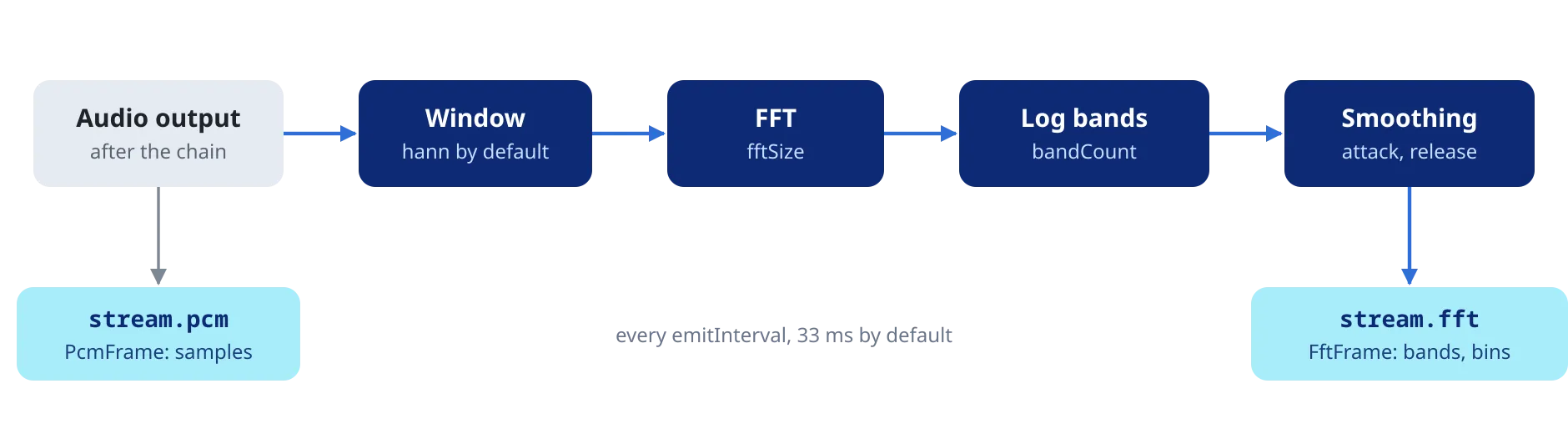
Spectrum, PCM, waveform overviews and loudness scans come out of patched FFmpeg filters and reach Dart as streams.
Getting libmpv into the app
A Dart build hook downloads the libmpv build for each target from the project’s releases, verifies it against a pinned SHA-256 and bundles it with the app. The builds themselves come from libmpv-scripts: Docker for Linux, Windows and Android, Xcode for Apple, with a verify stage that checks every artifact before release.
dependencies:
  mpv_audio_kit: ^0.5.0
final player = Player();
await player.open(Media('https://example.com/audio.mp3'));
await player.setAudioEffects([
// +3 dB around 100 Hz, then compress and limit
EqualizerEffect(frequency: 100, width: 50, widthType: EqualizerWidthType.h, gain: 3),
AcompressorEffect(threshold: 0.1, ratio: 4),
AlimiterEffect(limit: 0.9),
]);
player.stream.audioEffects.listen((fx) => print('${fx.length} stages'));Streams and protocols
HTTP(S), HLS, DASH and SMB2/3 are supported. For media servers, Jellyfin transcodes use seekable HLS, and
Plex’s per-stream /decision call is made from an on_load hook instead of a local proxy.
Next project
Vocem Overlay
Discord voice overlay drawn inside the game, for Linux.